

3. Adding Products to the Cart
Once you have reached the product selection step via the type, VIN, OE or item number search, registered users can add the product to the Szakál Met-Al webshop cart.
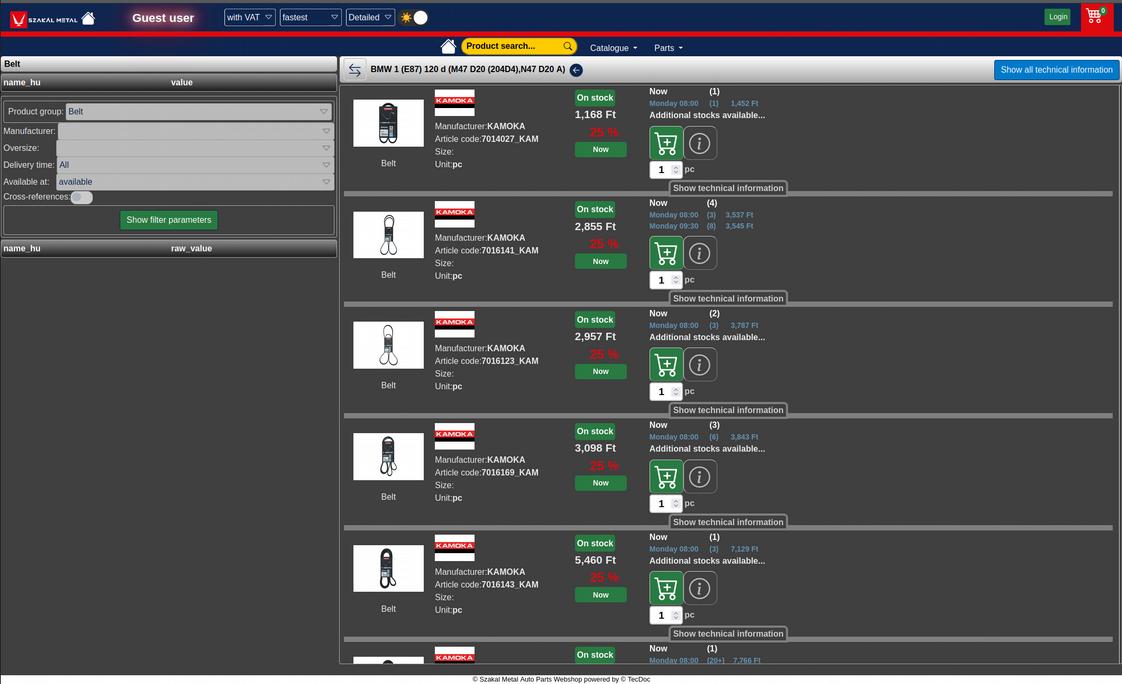
On the left (on mobile, after tapping a button in the bottom bar) you will find a search / filter panel where you can focus on the products that interest you. The left-right arrow (not available on mobile) hides or shows the filter panel. The arrow in a black circle after the type / model lets you choose parts for that vehicle from further product groups.
The car parts are listed one below the other; with the "Detailed" / "Simple" drop-down in the main menu you can control how much information you see at once – this is especially useful when a product has a much larger than usual list of options to choose from.
On the left of the list you will find the product image, which can be enlarged; if there are several images, you can switch between them. Next to it are the brand, item number, size and unit, with the product name below the image.
The middle column shows the price, the discount and the product's availability; further delivery times with prices are shown on the right. Here you can also view more information on the product data sheet using the ( i ) button, refresh stock information with the circular (360°) arrow, and add the specified quantity to the cart.
Please note that the product's unit is shown next to the quantity (piece, pair, pack, litre, etc.).