



1. Login, Registration
If you are not registered yet, click the "Login" button in the top right corner of the screen, then click "Registration" in the "Webshop login" window that pops up.
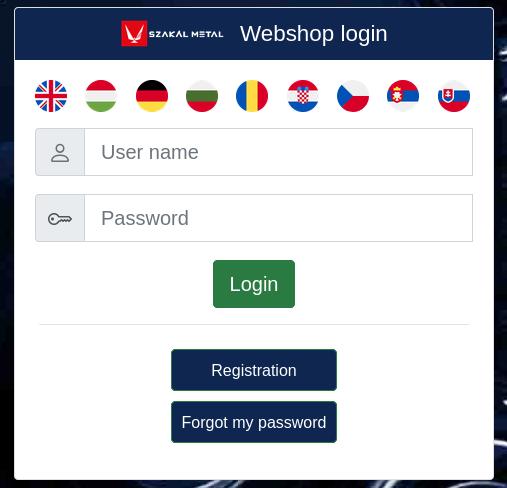
Once you have filled in the required details, your registration is created and you can log in.
If you already have a user account from our previous webshop (the version before 2023), you can log in with the same username and password. If you have an account from the previous webshop but have forgotten your password, you can request a new password for the new webshop.
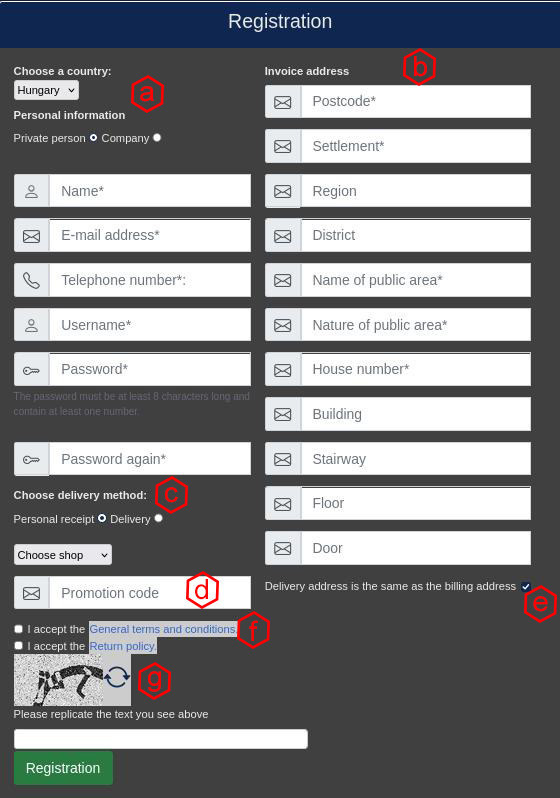
(a.) Personal details: enter the basic required details here. If you are not registering as a private individual, the Tax number must also be filled in – without it, the registration will not be created!
(b.) Billing address: invoices issued after your purchases will be made out to this address. If your Shipping address is different, untick the box and enter the shipping address details in the additional panel that opens.
(c.) Personal pickup or Delivery: here you can choose whether you will collect your order in person at a Szakál Metal branch selected from a pop-up window, or request delivery. Delivery may involve an additional charge, which is shown when you make your selection.
(d.) Promotion code: also known as a "Coupon code". If you have a coupon code from one of our periodic discount campaigns that you have not yet used, you can enter it here during registration.
(f.) Terms of use: confirmation that you accept the terms, which is mandatory for registration. You can read the terms by clicking the link. By ticking the box, you declare that you have read and understood the Terms of use, and that you are aware of the conditions of use and the warranty conditions.
(g.) Verification code: this protects against automated bots. Type the numbers / letters shown into the empty field. If you cannot read the code clearly, click the button with the circular arrows to generate a new one – you can do this as many times as you like, until you get a combination you can read properly.
Once you have filled in all the required details (a warning message will tell you if anything is missing), confirm your registration with the green Registration button. You will then receive an e-mail asking you to confirm your registration. After confirming it, you can log in with the details you provided and add products to your cart as a fully registered user.
Amenyniben minden szükséges adatot kitöltött (melyekről hiányzó létük esetén figyelmeztető üzenet tájékoztat), a regisztrációt a Regisztráció zöld gombbal hitelesítheti.
Ezt követően, egy egy regisztrációt megerősítő Emailt kap, majd miután azt is elfogadta, a megadott paraméterekkel beléphet és akár kosárba is helyezhet árut, teljes értékű, regisztrált felhasználóként.
ATTENTION!
Especially if you registered with an @hotmail or @outlook e-mail address, please also check your Junk e-mail (Spam) folder!
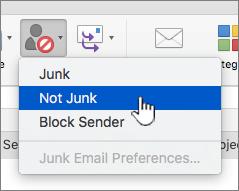
If you find the registration e-mail there, we recommend clicking the Not junk (Not spam) button
(The link in the e-mail still works even from the junk folder, but Microsoft will show a warning asking whether you really want to visit that URL...)
